- When you are ready to create or upload a reel to Instagram, you will find many ways to customize your reel, thus making your reels popular easily.
- You can also tap text from the bottom, and choose to add a speech profile, which will read the text you added to the screen.
- Try to keep the text close to the center of the screen, as the bottom part is hidden by the layout of the rails.
Short Videos have replaced long form video content, across all social media platforms. It started with TikTok, and then YouTube Shorts, and Instagram reels have been giving a boost to short content on the right platforms. If you want to get on the shorts wagon and create reels on Instagram, today I will share everything you need to know about Instagram Reels and how to make your reels famous.
Also, Read | Top 10 Instagram Tips 2022, Tips You Should Know
What are Instagram Reels?
Instagram Reels is a move from Facebook (Now Meta), to offer the same feature as Tiktok, which was announced back in August 2020. Where you can create short videos, up to 60 seconds, previously the limit was only 15 seconds, later Instagram increased the limit. Your reels will appear at home and check out the page of other Instagram users.
How to create Instagram Reels?
There are 5 ways to create and upload an Instagram Reel from your account. You can shoot a reel right from your phone’s camera or upload a pre-edited video.
How to customize your Instagram Reels?
When you are ready to create or upload a reel to Instagram, you will find many ways to customize your reel, thus making your reels popular easily. This customization is divided into 2 parts, before capturing the video, and after capturing the video.
Customization options
- Adjust Video Length – There are 3 video lengths based on reels, namely 15 seconds, 30 seconds, and 60 seconds. You can convert to set the desired video length.
- Add Music – You can add trending music or your favorite music.
- Video speed – You can adjust the speed of the video, and slow it down to as slow as 0.3x and fast forward to 3x maximum.
- Reels Video Structure – You can start from 3 video creations, add a previous effect, or show the scene at different times.
- Compare – This helps you shoot more videos in the same way, and makes your reels look professional

- Automatic video timer – You can adjust the timer to automatically stop recording, to capture multiple clips that fit into 60 seconds of reel time.
- Add Results/Filters – You can also add various trendy filters or effects to add a dramatic touch to your reels.
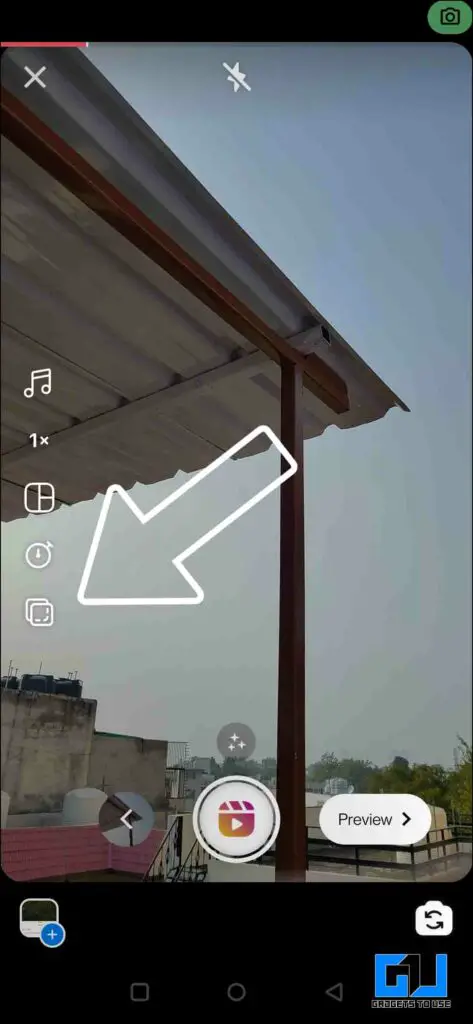
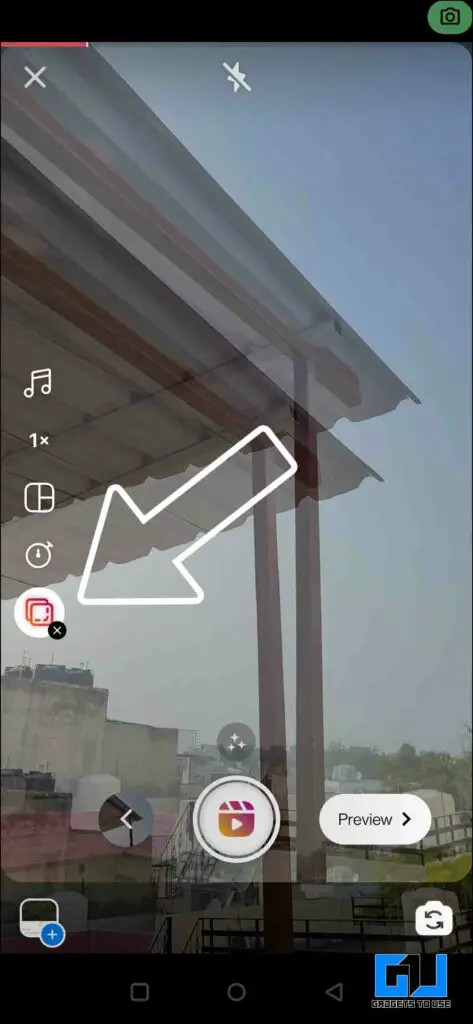
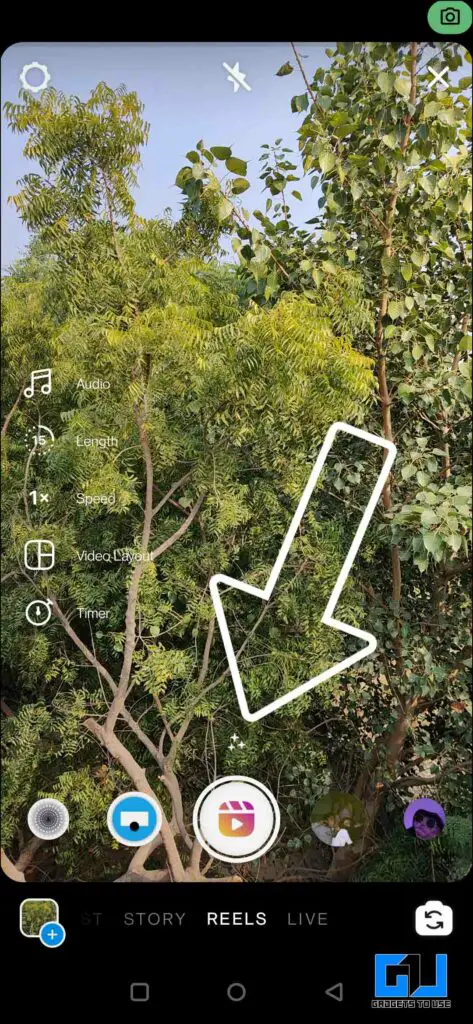
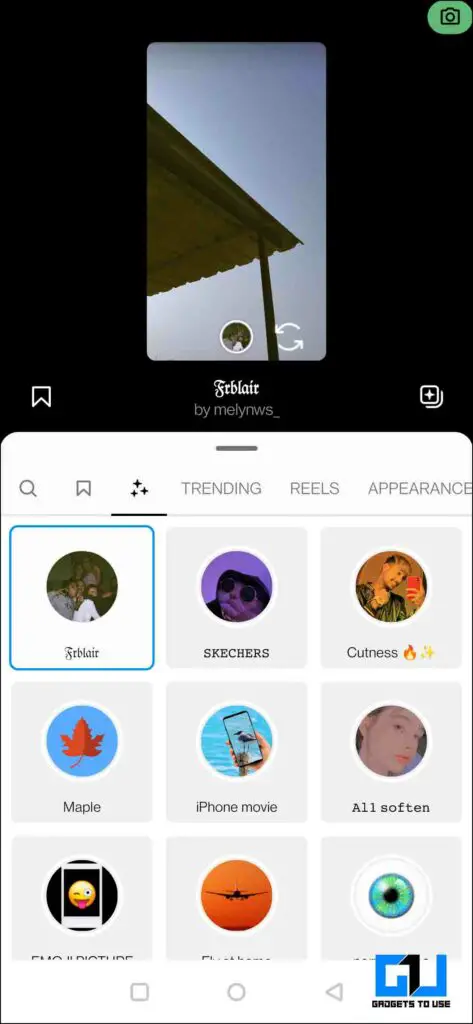
Once you are done with these pre-capture customizations, we move on to post-capture customizations that can also help you create popular reels.
- Adjust Volume Mix – You can adjust the volume of the original Audi video, as well as the music added to the previous screen.
- Add Voiceover – If you would like to add your voice, you can do so from here. You can apply many cool voice effects to camera roll audio, or to your own voice.
- Add results – Here’s another chance to add any trading results/filters, if you haven’t already.
- Add Stickers – You can add stickers, including captions to your reels.
- Draw – If you like to add a little painting touch to your reel, then it can be done from here.
- Add text – You can also add text to your reels, long press the text to make it appear in a specific frame of your reel. Try to keep the text close to the center of the screen, as the bottom part is hidden by the layout of the rails.
- You can also tap text from the bottom, and choose to add a speech profile, which will read the text you added to the screen.
How to publish a Reel on Instagram?
Now, that we’ve shot/uploaded, and finished customizing the reel, it’s time to add the finishing touches to our reel, so we can post it to Instagram.
- Add Cover Photo – Adding a cover to your reel, is an important step, as it is the first impression of the reel, anyone on Instagram will see this first, and make someone click and view your reel. You can add an already edited cover photo from your phone’s gallery, or you can choose any frame from your reel.
- Add caption – After the cover photo, the next step is to add captions to your reel, you can type whatever you like. Just make sure it matches the content of your reel, to help the audience understand it easily. Add relevant tags to help Instagram’s algorithm understand the content of your reel, and reach a larger set of audiences.
- Crop Profile Picture – You can choose to make your reel visible in your feed along with your photos and videos. Just enable the toggle to do so, and you can adjust how the cover image (that you added earlier) should appear in your feed. Make sure you set it correctly, as once it’s set you can’t edit it once the reel has been sent.
- Tag People – Here you can tag people on your wheel, so it’s easy to reach them and check their profiles.
- You can also post the same reel to multiple accounts, tagging the people in the reel as contributors. You can check how to use the Instagram Collab feature.
- Add Location – You can add a location to your reels to make it subject to a specific location search.
- Rename Audio – If you would like to change the sound name of your reel, you can do so here, but you can only change it once.
- Recommend on Facebook – You must keep this switch on, it will recommend your Instagram reel to Facebook, with your Instagram user ID. You need to have a Facebook account for this.
- Advanced Settings (Paid Partnership) – This is for creators and brands. This is to let your audience know that the content shared is in partnership with something in return.
- Share – Now, that everything is ready, just press the share button to send your reel.
How does Instagram’s Reels Algorithm work?
The algorithm is a complex mystery, and it keeps changing over time. But recently Instagram released some useful information, which can help you make your reels reach more people and make your reels popular. 
The Instagram algorithm pushes the following reels:
- Reels that are fun and exciting (ie they entertain people, grab their attention, make them laugh, or have a fun surprise or twist)
- They are inspirational (ie they start a trend that others can easily participate in)
- Use creative tools like text, filter, or camera effects
- It uses direct video
- Use music from Instagram’s music library and/or original audio you create or receive from Reels
- Reels that have not been copied from other applications, and do not contain the watermark of those applications
- They are tempting! Try something new, be yourself, and see what works for you.
You should keep the points mentioned above while shooting, making, and uploading video reels to Instagram, to make the algorithm work for you.
How to check the details of your Instagram Reels?
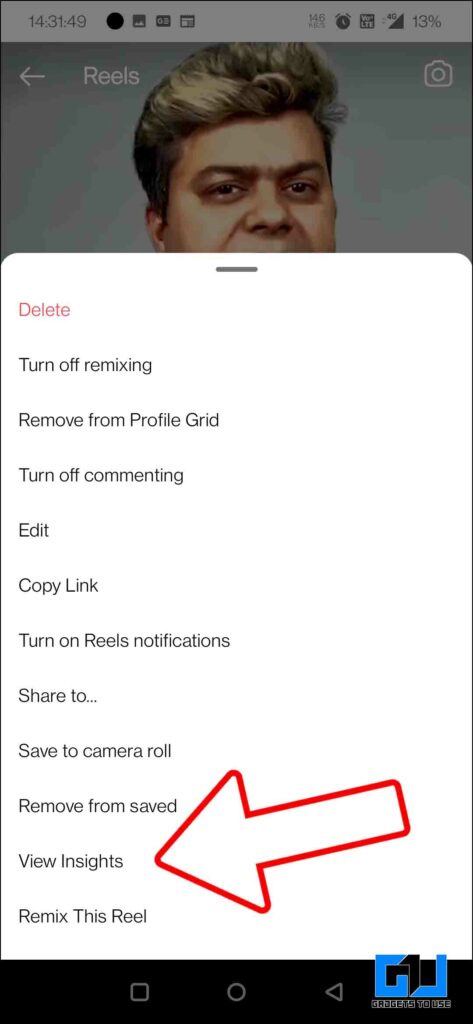
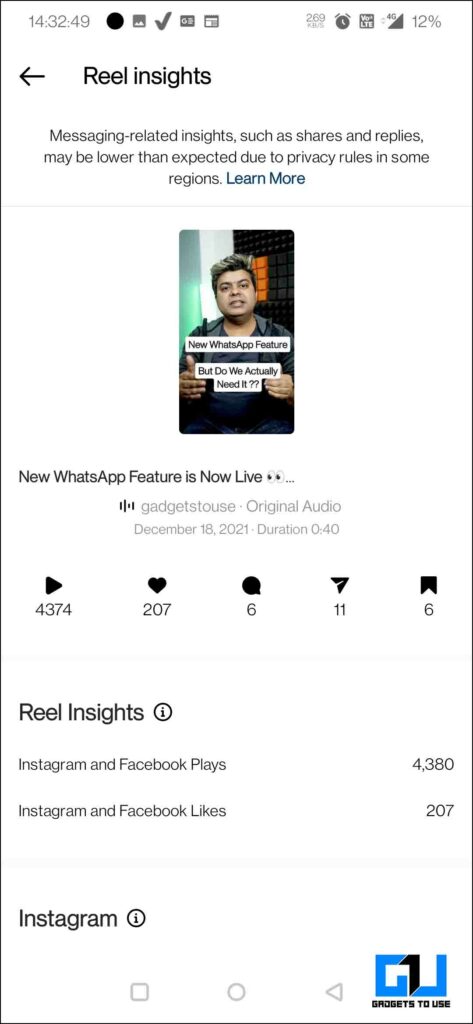
Now that we know how to upload a reel, which are the types of reels that Instagram tends to like, it adds an amazing touch to your reels. It’s time to test how well your reels are performing, and what kind of content your audience prefers to see and engage with. And it will help in making your reels popular.
You can check the sensitivity of your reels, in two different ways. We have talked about both ways check the details of the reels.
Advanced Tips for Instagram Reels
Optimization is the key to success, and to make your reels popular, you need to keep improving your content. What better way to improve than by checking out popular reels and popular creators. There are a few tips for keeping track of the reels you’ve watched, so you can watch, and remember what inspiration you want to take from that reel.
- Download Reels Video With Audio – You can download your favorite video reels, from your phone’s storage. To be easily accessible, even without an internet connection. You can check out our guide where we shared 5 ways to download audio reels.
- Check your Reels viewing history – You can check the history of the reels you liked and saved. You can always check them out whenever you want to be motivated. You can check out our guide at check your reels history.
- Reply to comments using Reels video – You can strengthen the bond with your audience, by responding to their comments with video reels. This will make them feel special, and you will be saved from responding to the same type of comments over and over again. You can check the guide to reply to comments with reels.
- Edit Reels video – Consistency is very important to grow in any field, sometimes you need to schedule several days to maintain this consistency. There is a way to edit them, you can check out our guide to editing reels on Instagram.
Wrapping up
So this is everything you need to know to get started and make your Instagram Reels popular. All these tools and features will help you grow your Instagram reels, reach, and audience. These tools will only help you, the final result depends on how you use these tools. Remember that the magic is within you, and only that magic can make you a star, every star has their own style and charm, and struggle. You need to find and make your own way, rather than following someone else’s way. Stay tuned for more such tips and tricks.
You can also follow us for the latest tech news at Google News or for tips and tricks, smartphones and gadgets reviews, join GadgetsToUse Telegraph Group or subscribe to get the latest video reviews GadgetsUsing the YouTube Channel.
Was this article helpful?
YesNo