- You can apply for a mini PAN Card as a parent or guardian by visiting the government-authorized NSDL Portal and follow the steps below.
- Scroll down a bit and fill in the details like title, where you select Shri for men and Kumari for single women.
- Enter the full name of the parents, and choose whose name you would like to be printed on the PAN card.
A PAN (Permanent Account Number) card is an important proof of your identity in India. Issued by the Department of Revenue. Accordingly, PAN ensures tax compliance of the cardholder and tracks his financial activities. Although children are not tax-exempt, PAN card is important in many other cases. This mainly includes aspects of financial planning, investing for their future, and seeking government benefits. A mini PAN card can be applied for by parents or guardians of children below 18 years of age. Let’s see how you can apply for the same.
Apply Mini PAN Card Online
You can apply for a mini PAN Card as a parent or guardian by visiting the government-authorized NSDL Portal and follow the steps below.
Registering Small PAN Application
1. Open the NSDL portal. On the home page, select New PAN – Citizen of India (Form 49A) from the ‘Select PAN Application Type’ drop-down menu. Similarly, choose ‘Come inone thing‘ under ‘Select Applicant Category’.
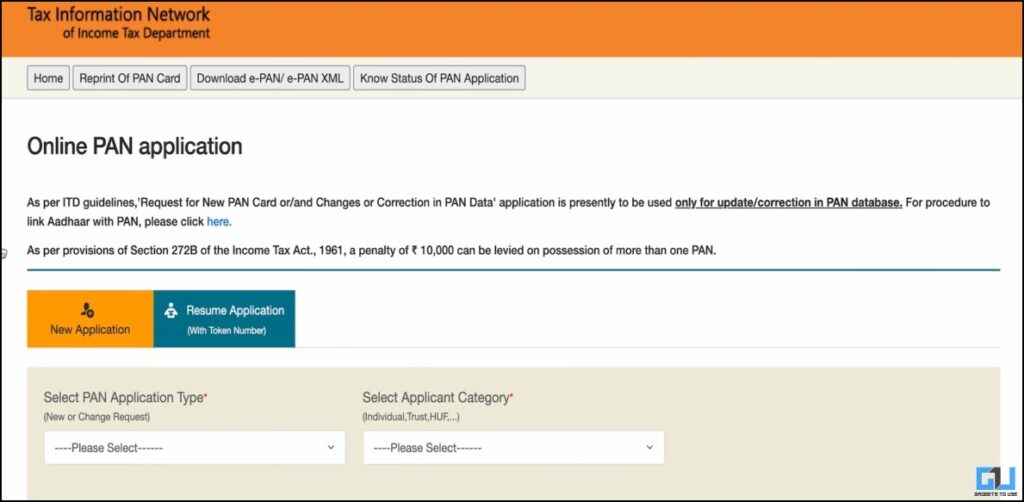
2. Scroll down a bit and fill in the details like title, where you select Shri for men and Kumari for single women. Along with this, enter your Full Name and first name, middle name (if any), and last name.
3. Additionally, you will also need to enter the minor’s date of birth. As parents and guardians will be holding the PAN, it is recommended to enter their email ID and contact number. Now, tick the checkbox that accepts the terms and conditions, and after confirming the captcha, hit ‘Submit’.
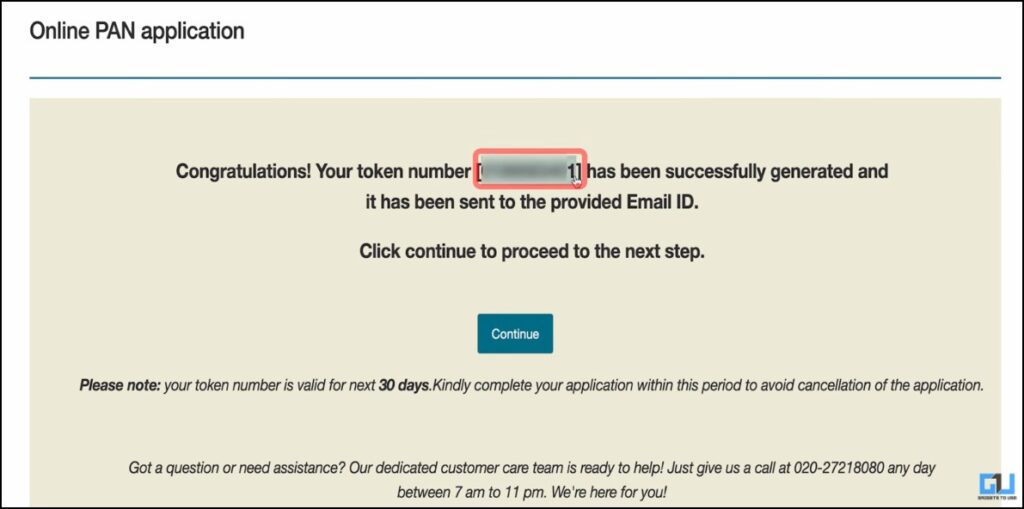
A token number will be generated and sent to you via the email address you provided. Here, press ‘continue’. Also remember that the application form will have to be completed within 30 days, as stated on the web page.
4. Now select a physical copy to be delivered to your address, and a soft copy to your email. Along with that, enter the last 4 digits of your Aadhar and select the gender of your ward.
5. Enter the full name of the parents, and choose whose name you would like to be printed on the PAN card. Before proceeding, click ‘Save Draft’ in the top right corner.
6. Continue to enter other information, such as income (not applicable for children, so select ‘No income’), residential address, and leave office address blank (also not applicable).
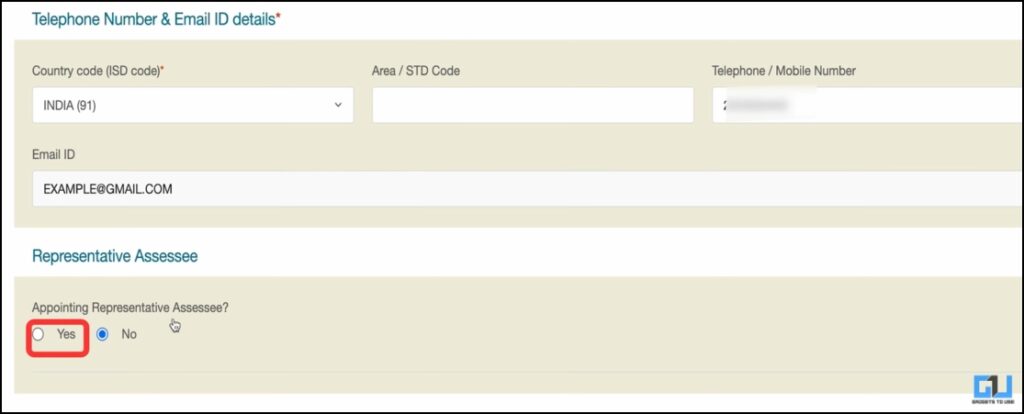
7. Under Inspector Representative, select ‘Yes’ and add the parent or guardian’s information, such as title, name, and address. Now click on ‘Next’.
8. To fill in the AO Code, based on your nearest Tax Office, select ‘Indian citizen’ under ‘For AO Code, select from the following’. Now select your country and city, then click ‘Download’ and select the nearest Tax Office. The AO code fields will be filled in automatically. Now click on ‘Next’.
Verification, Payment and Delivery of PAN
Now, you have to select the enclosed document Proof of identity, address, and birth. In case of minor child, AADHAR card can be sufficient for all of them. In the announcement, you will see the parents’ names displayed. There, select Test Representative, enter the location and date, and click ‘Submit’.
You will get a prompt, “The application is being sent. Below this, enter the first 8 digits of AADHAR and confirm all the other details sent earlier. If there is an error, click ‘edit’; otherwise, click ‘continue’. Now make the payment by selecting any of the payment options on your screen. Furthermore, click ‘continue’ on the terms page after accepting the receipt and clicking on the accept page.

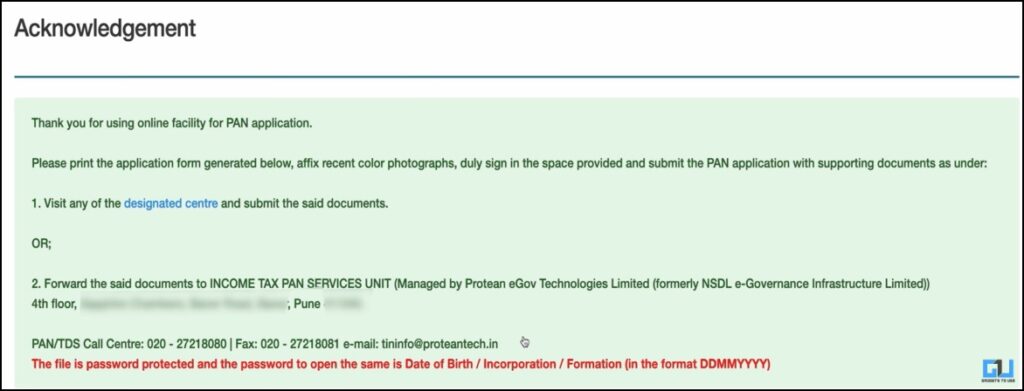
Click on ‘Generate and Print’ and then click on ‘Download PDF’. This will be a password protected document, and the password will be the applicant’s date of birth in DDMMYYYY format.
This document will need to be printed and attached with 2 passport size photographs of the applicant, attested by the representative’s signatures. Further, a copy of AADHAR will have to be sent along with this to the Income Tax Office in Pune. The address that will be displayed on your screen.
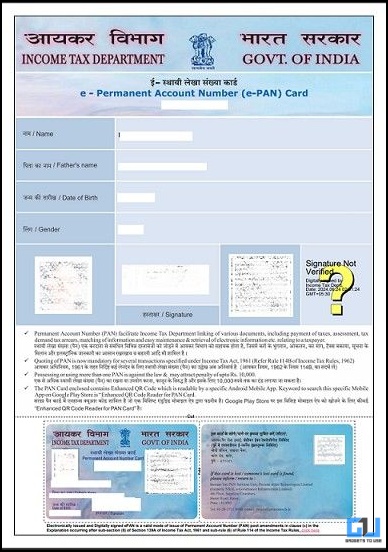
Oafter the documents have been submitted and your application has been processed,ywill be has been sent digital copy (e-PAN) by email. Also, the physical PAN Card will be delivered to your address within 10-15 days.
Difference Between Mini PAN and Normal PAN
Mini PAN is almost similar to Normal PAN in terms of structure, but there are some differences:
- Mini PAN does not include signature and personal photograph. The details of parents or guardians are linked to the PAN card, instead.
- For financial transactions, a child cannot use PAN independently. Until a person becomes an adult, all activities, including PAN, must be done by parents or guardians.
Frequently Asked Questions
Q. Is Minor PAN valid after a person turns 18?
Yes, PAN is valid, but it needs to be updated once the person turns 18. They will need to add their signature, as it is not in Mini PAN, along with a current photograph.
Q. How can I check the status of my PAN card application?
You can visit the NSDL website and enter your application number to check its status.
Wrapping up
The process is a bit detailed, but still flexible to apply for Minor PAN through the NSDL portal. Additionally, getting a Minor PAN is important for financial planning. There are many benefits, such as receiving scholarships and government programs, investing in the child’s name, opening a bank account, and working as a nominee.
You may also like to read:
Have questions related to our how-to guides, or anything in the tech world? Check out our new GadgetsUsing an AI Chatbot free, powered by ChatGPT.
You can also follow us for the latest tech news at Google News or for tips and tricks, smartphone and gadget updates, join GadgetsToUse Telegraph Groupor subscribe to GadgetsUsing a YouTube Channel for the latest updated videos.
⬇️ Gadgets To Use Site Search ⬇️
You can find anything on our website, including tech how-to, solution or review using the google site search box below.
Was this article helpful?
YesNo