Announcing Adobe Captivate 13.1: Bring Your Classic Projects Forward

We are happy to share Adobe Captivate 13.1releases designed to help you get more value from what you already create, while giving you new ways to design engaging, modern experiences.
Whether you’re dealing with legacy content, building interactive courses, or targeting a global audience, this release is about making your workflow faster, smoother, and more flexible.
What’s New in Captivate 13.1
-
Bring Your Old Captivate Projects Forward (Beta)
If you’ve been holding on to the old Captivate Classic projects, this one’s for you.
With the new Classic (beta) project import, you can bring your existing courses straight into Captivate 13.1. That means:
-
- You can import your old projects without starting over
- Reuse slides, content, and supported interactions
- Continue working with your legacy content in a modern authoring environment
In short, no more rebuilding everything from scratch. It saves time, effort, and a lot of frustration.
-
Import Simulation Projects from Captivate Classic (Beta)
If you’ve built your own software simulations in Captivate Classic, you can now start bringing them into the new Captivate experience. Adobe Captivate 13.1 introduces beta support for importing simulation projects, including software demos and training simulations. This gives you a way to reuse existing functionality instead of recreating everything from scratch.
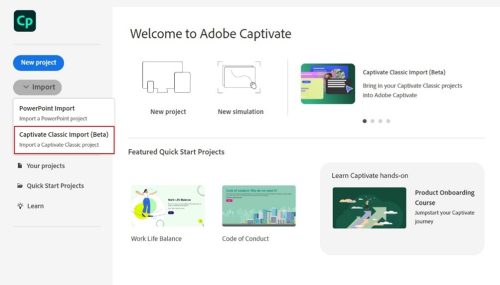
Here’s what it comes down to now:
-
- Highlight the boxes
- Click on the boxes
- Input fields
- Writes the script
Since this feature is still in beta, a few things to keep in mind:
-
- Motion recording (FMR) content may not load as expected
- Some formatting and interactions may require manual review and correction
While support is still ongoing, this is a solid first step to simplify simulator migration so you can test, adapt, and update your content at your own pace.
-
Slide Widget: Capture Meaningful Student Input
The slide widget adds a reflective, interactive layer to your lessons by letting students express how strongly or confidently they feel, instead of choosing a single answer.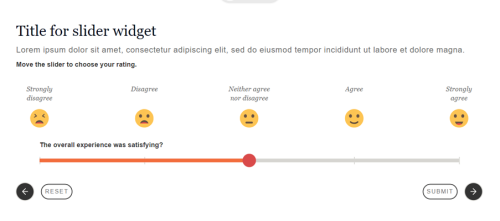
It works especially well for:
-
- Self-examination
- Self-confidence is a test
- Questions based on ideas
Students can move the slider to indicate their level of agreement, readiness, or understanding, making the experience feel natural and thoughtful.
By replacing standard question formats with a flexible measurement style interface, you create something that is not only attractive but also usable.
-
Stack Card Widget: Easy, Focused Reading—One Card at a Time
If you prefer a more experimental style, the Stack Card widget is a great addition. The Stack Card widget allows you to present content as a set of neat, layered cards that students can move through one step at a time. With a simple click or tap, each card snaps into focus, making it a lightweight, distraction-free experience that works best on mobile devices.
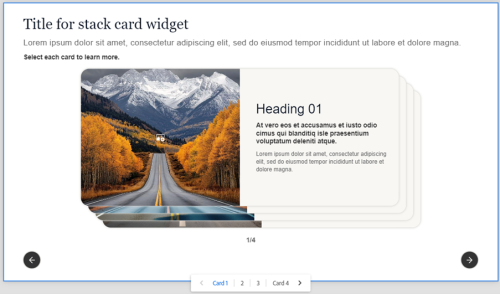
With built-in animations, multiple design options, and responsive behavior across devices, it’s easy to create a polished, interactive experience without extra effort.
-
Smart PowerPoint introduction
Importing PowerPoint has flexible settings. Now you can:
-
- Select only the slides you want to import
- Add more slides later to an imported Adobe Captivate PowerPoint project
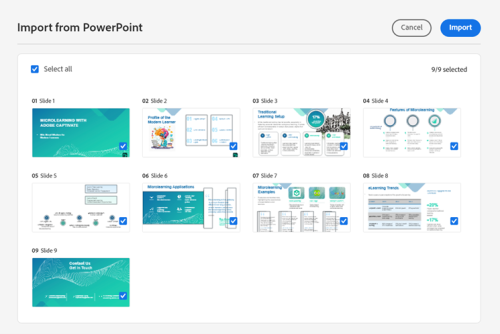
It’s a simple change, but it saves time if you’re constantly working on presentations.
-
Right-to-Left (RTL) Author: Build a Global Audience
Creating right-to-left language courses is now even easier with built-in RTL authoring support in Adobe Captivate 13.1.
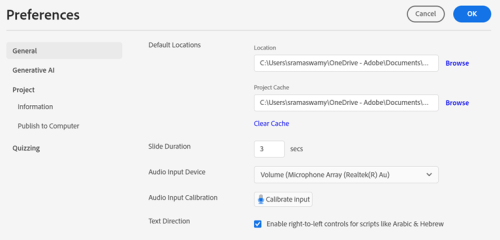
You can design lessons in languages like Arabic, Hebrew, and Persian, with Captivate’s easy-to-use text guide, layout, and editing. The result? Content that feels natural and intuitive to RTL readers without extra work or manual adjustments.
It’s an easy way to make your courses more inclusive and truly global.
Why This Release Is Important
Combining content reuse, powerful new widgets, and improved localization, this release helps you go faster without compromising quality. Whether you’re modernizing legacy studies, building simulations, or designing new immersive experiences, Adobe Captivate 13.1 gives you the tools to create smarter, faster, and at scale.
Ready to try it?
Click here to upgrade to the latest version (Windows and macOS) and experience the magic of Adobe Captivate 13.1. Your next great read is just a few clicks away!
New to Captivate, try a free 30-day trial:
You can also download a free 30-day trial of this update. Credit card information NO what is needed.
We appreciate your feedback!
If you encounter any problems or have suggestions for future improvements, please do not hesitate to contact support at tcssup@adobe.com or submit your development request on the Adobe Captivate UserVoice page.
We’re excited for you to check out the new features and enhancements in Adobe Captivate 13.1, and we look forward to hearing about your experiences. Stay tuned for more updates and thank you for choosing Adobe Captivate.
Hello!
Sharath Ramaswamy
Adobe Captivate Master Preacher